The Apple Magic Mouse is one of the most recognizable computer mice available. Its slim design, aluminum finish, and smooth Multi-Touch surface make it a natural companion for a MacBook, iMac, or Mac mini.
But good looks aren’t enough for a mouse. The Magic Mouse has been around for years, and competitors now offer better ergonomics, more physical controls, and more convenient charging.
The current USB-C version fixes one long-standing issue by replacing the older Lightning connector. But is the Apple Magic Mouse actually worth buying in 2026?
Apple Magic Mouse: Quick Verdict
Rating: 4/5
The Apple Magic Mouse is a stylish and compact mouse that works particularly well with macOS. Its Multi-Touch surface makes scrolling and swiping through apps feel natural, while Bluetooth pairing is simple.
However, its extremely flat design isn’t the most comfortable for long work sessions, and the charging port remains on the bottom. That means you cannot use the mouse while it is charging.
Best for: Mac users who value design and gestures
Not ideal for: Long work sessions, gaming, or users wanting ergonomic comfort
Design and Build Quality
Design is probably the Magic Mouse’s biggest advantage.
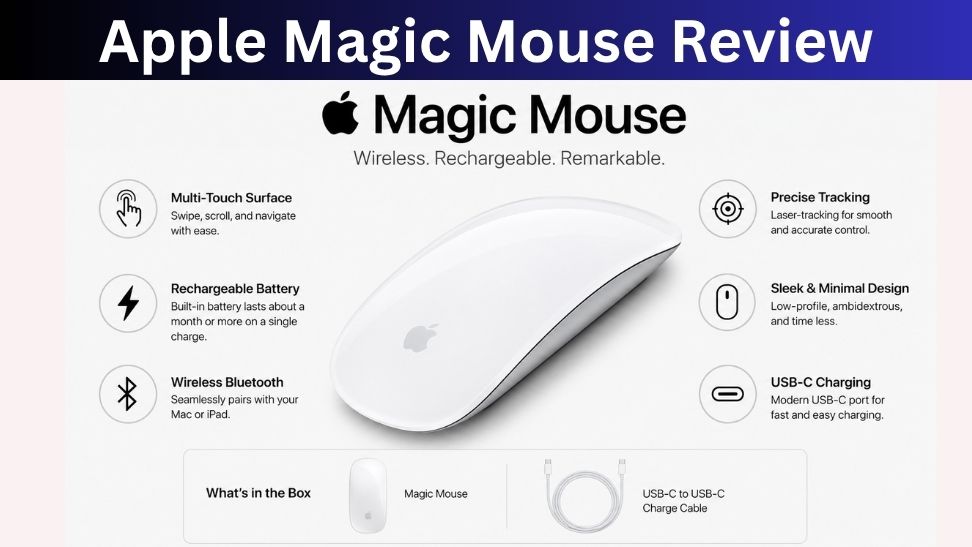
It has a slim, minimalist body with an aluminum base and a smooth Multi-Touch surface. At about 0.22 pounds, it’s light enough to carry easily with a MacBook. Apple also designed the feet to let the mouse glide smoothly across a desk.
The compact shape is convenient, but it comes with a trade-off. Unlike ergonomic mice such as the Logitech MX Master series, the Magic Mouse doesn’t provide much palm support.
For short periods, that’s not a major issue. During several hours of continuous work, however, the low-profile shape can become less comfortable.
Multi-Touch Surface
The Magic Mouse doesn’t rely on a traditional scroll wheel.
Instead, almost the entire top surface works like a small trackpad. You can scroll through documents, swipe between pages, move between full-screen apps, and use other gestures supported by macOS.
This is what makes the Magic Mouse different from most conventional mice.
If you’re already comfortable using a MacBook trackpad, the gesture controls feel familiar. Scrolling and switching between applications can feel particularly smooth.
The downside is that there aren’t many physical buttons to customize. Users who want programmable controls for productivity applications may find a conventional mouse more useful.
Tracking and Everyday Performance
For normal Mac use, the Magic Mouse handles basic tasks well. Cursor movement, web browsing, document work, and general office tasks are straightforward.
However, it isn’t designed as a high-performance gaming mouse. Independent testing from RTINGS found limitations in sensor performance and click latency, making it a poor choice for competitive gaming.
For most Mac users, this won’t matter. The Magic Mouse is primarily a productivity and multimedia accessory rather than a gaming peripheral.
Connectivity
The Magic Mouse connects wirelessly through Bluetooth and pairs automatically with compatible Macs.
There is no USB receiver to plug into your computer, which is especially convenient for newer MacBooks that focus heavily on USB-C connectivity.
Apple also sells the current model with a USB-C charging cable.
For a Mac-focused setup, the wireless experience is simple and clean.
Battery Life and Charging
Battery life is one of the Magic Mouse’s better features.
Apple says the rechargeable battery can last about a month or more between charges, depending on usage. That means most users won’t need to think about charging it frequently.
The USB-C connector is a welcome improvement over previous Lightning versions.
Unfortunately, Apple’s unusual charging design remains.
The charging port is located on the underside of the mouse. Because of this, the Magic Mouse cannot be used while connected to a charging cable. Apple itself confirms that the Magic Mouse is unavailable for use while charging.
It’s not a huge problem if you regularly charge the mouse, but it’s still an unnecessary inconvenience.
Apple Magic Mouse for Mac
The Magic Mouse makes the most sense if you’re already invested in Apple’s ecosystem.
Its design matches Apple’s computers, Bluetooth pairing is straightforward, and the Multi-Touch gestures integrate naturally with macOS.
If you mainly use a MacBook for browsing, documents, presentations, and everyday work, the Magic Mouse can be a pleasant upgrade from a basic mouse.
Windows users should look elsewhere. Although the hardware can work with Windows, many of its gesture-based features are designed specifically around macOS. RTINGS notes that Windows functionality is much more limited compared with macOS.
Apple Magic Mouse vs Logitech MX Master
The biggest difference is philosophy.
Apple prioritizes minimalism, portability, and gestures, while Logitech focuses more on ergonomics, customization, and productivity.
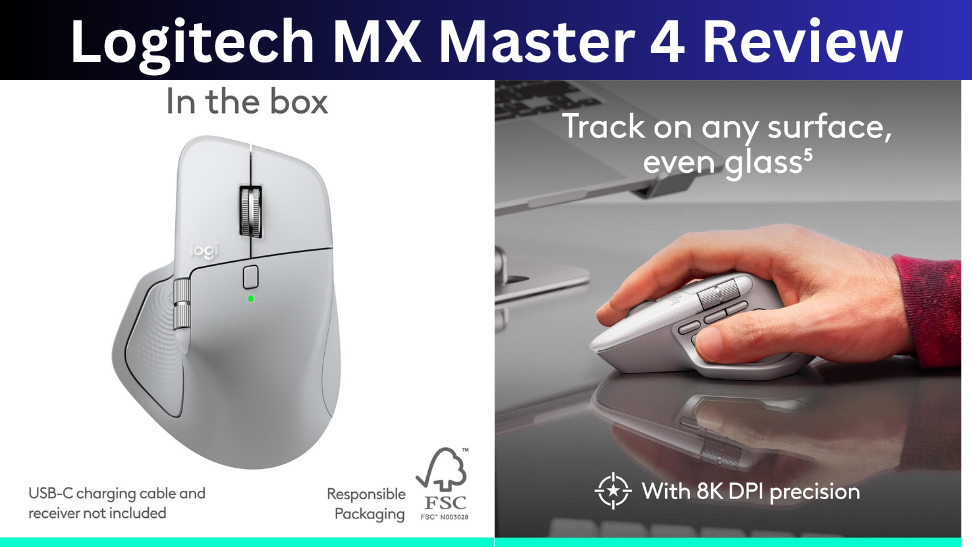
The Magic Mouse is thinner and lighter, making it easier to carry. The MX Master-style design is larger but provides more support for your hand and more dedicated controls.
If you work for eight hours a day and need programmable buttons, Logitech is generally the better choice.
If you care more about Apple’s design language and Multi-Touch gestures, the Magic Mouse remains appealing.
Pros and Cons
Pros
- Excellent minimalist design
- Lightweight and portable
- Smooth Multi-Touch gestures
- Easy Mac integration
- Bluetooth connectivity
- Long battery life
- USB-C charging on the current model
Cons
- Flat design isn’t ideal for long sessions
- Charging port is underneath
- Limited physical controls
- Not suitable for serious gaming
- Less customizable than many competitors
Who Should Buy the Apple Magic Mouse?
The Magic Mouse is best for Mac users who want a lightweight, stylish mouse that integrates naturally with macOS.
It’s particularly suitable for people who enjoy trackpad-style gestures and don’t need lots of customizable buttons.
It’s also a good option for people who frequently carry their mouse with a MacBook because of its slim design.
Who Should Skip It?
Skip the Magic Mouse if comfort is your top priority.
People who spend most of their workday using a mouse may prefer a more ergonomic model. It’s also not the right choice for competitive gaming or users who need lots of programmable controls.

Final Verdict
The Apple Magic Mouse remains an attractive option for Mac users, but it’s not automatically the best mouse simply because it carries the Apple logo.
Its minimalist design, Multi-Touch surface, lightweight body, and seamless Mac integration are genuinely useful. The USB-C update also brings the charging connection in line with Apple’s current ecosystem.
However, the flat shape and bottom-mounted charging port remain frustrating compromises.
For casual Mac users who value design and gestures, the Magic Mouse is still a good choice. For professionals who spend long hours at their desk, a more ergonomic mouse such as the Logitech MX Master series is likely to offer better overall comfort and productivity.
Topgadgets.online is a participant in the Amazon Services LLC Associates Program, an affiliate marketing program that enables website owners to earn referral commissions by linking to products available on Amazon.com and related Amazon marketplaces.