The right mouse can make a big difference when you spend hours working at a computer. Logitech’s MX Master series has been a popular choice for productivity users for years, and the Logitech MX Master 4 continues that approach with a comfortable design, advanced controls, multi-device connectivity, and extensive customization.
But at around $119, this isn’t a cheap wireless mouse. So, is the MX Master 4 worth the money, or is the older MX Master 3S still the smarter buy?
After looking at its design, performance, features, and overall value, the MX Master 4 is an excellent productivity mouse, although its upgrades won’t be equally useful for everyone.
Logitech MX Master 4: Quick Verdict
Rating: 4.5/5
The MX Master 4 is best suited to professionals, office workers, programmers, designers, and anyone who spends several hours a day using a computer.
Its biggest strengths are comfort, precise tracking, excellent scrolling, customizable controls, and multi-device support. The main drawbacks are its relatively heavy design and premium price.
Best for: Productivity and office work
Not ideal for: Competitive gaming or small hands
Verdict: One of the best premium productivity mice available.
Design and Comfort
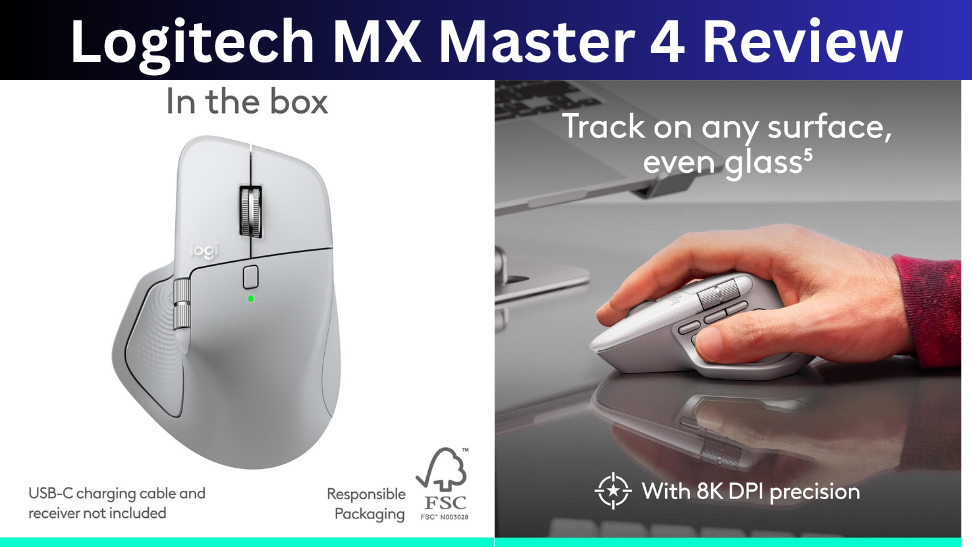
The MX Master 4 keeps the familiar ergonomic shape that made previous MX Master models so popular. It has a large right-handed body, a sculpted palm area, a thumb rest, and dedicated side controls.
This design is particularly comfortable during long working sessions. Instead of feeling like a small portable mouse, the MX Master 4 provides plenty of support for your hand.
However, its larger size can be a disadvantage for people with small hands. It is also considerably heavier than most modern gaming mice.
The build quality feels premium, and Logitech has moved away from the older soft-touch rubberized coating used on the MX Master 3S. Recent testing from RTINGS also highlights the mouse’s strong build quality and comfortable ergonomic shape.
Tracking and Performance
The MX Master 4 uses Logitech’s high-precision Darkfield sensor with sensitivity up to 8,000 DPI. That’s more than enough for everyday productivity, photo editing, browsing, and general desktop work.
In practical use, the mouse is designed more around control and productivity than raw gaming performance. The tracking is accurate, while the adjustable sensitivity lets you find a setting that works for your monitor and workflow.
It can also handle occasional gaming, but competitive gamers should choose a dedicated gaming mouse. RTINGS found its gaming performance adequate for casual play but limited by its low polling rate and heavier design.
MagSpeed Scroll Wheel
The MagSpeed scroll wheel remains one of the best features of the MX Master line.
You can switch between precise click-by-click scrolling and a much faster free-spinning mode. That makes a noticeable difference when moving through long webpages, documents, spreadsheets, or timelines.
There’s also a horizontal thumb wheel. This is particularly useful when working with wide spreadsheets or applications where you frequently need to move from left to right.
These aren’t flashy features, but they’re the kind of controls that can genuinely save time once they become part of your daily workflow.
Buttons and Customization
The MX Master 4 offers multiple customizable controls, including its main buttons, side buttons, thumb wheel, and new haptic control features.
One of the biggest additions is the Actions Ring, which gives users quick access to customizable shortcuts and tools.
The haptic feedback is another new feature. It can provide tactile feedback for certain actions and work with customizable controls through Logitech’s software.
For power users, these features can be useful. Designers, programmers, and people who use specific applications every day can configure the mouse around their workflow.
For someone who mainly checks email and browses the web, however, many of these advanced controls may be unnecessary.
Connectivity and Battery Life
Connectivity is one of the MX Master 4’s strongest areas.
It supports Bluetooth and Logitech’s Logi Bolt receiver, and you can switch between up to three connected devices. This is especially convenient if you regularly move between a desktop, laptop, and another computer.
Battery life is also excellent. Logitech rates the mouse for up to 70 days on a full charge, with USB-C charging for convenient top-ups.
That means you shouldn’t have to worry about charging it frequently during a normal work schedule.
Logitech Options+ Software
The hardware becomes much more useful when paired with Logitech’s customization software.
You can assign different actions to buttons, create application-specific controls, and customize the mouse according to the programs you use.
For example, the same button can perform one action in a web browser and another in an editing application.
The downside is that some advanced features depend on software running in the background. If you prefer a simple plug-and-play mouse with no configuration, this may feel like unnecessary complexity.
MX Master 4 vs MX Master 3S
The MX Master 4 is more of an evolution than a complete redesign.
It keeps many of the MX Master 3S’s strengths while adding features such as haptic feedback, the Actions Ring, updated materials, and other refinements.
For someone buying their first premium productivity mouse, I’d choose the MX Master 4 if the price fits the budget.
For existing MX Master 3S owners, the upgrade is harder to justify. If your 3S is still working well, the new features may not be enough to make replacement necessary.
Recent reviews from Tom’s Guide and TechRadar reach a similar conclusion: the MX Master 4 is an excellent productivity mouse, but the changes from the 3S are evolutionary rather than revolutionary.
Pros and Cons
Pros
- Excellent ergonomic design
- Precise tracking
- Excellent MagSpeed scroll wheel
- Useful horizontal scrolling
- Extensive customization
- Multi-device connectivity
- Long battery life
- Quiet main clicks
Cons
- Expensive
- Heavy compared with gaming mice
- Large design may not suit smaller hands
- Some advanced features require software
- Not designed for competitive gaming
Who Should Buy the Logitech MX Master 4?
The MX Master 4 is a strong choice if you work at a computer for several hours a day and want more control than a basic wireless mouse can provide.
It’s particularly well suited to office professionals, programmers, designers, content creators, and users who regularly work across multiple computers.
If you already own an MX Master 3S, however, there’s less urgency to upgrade.

Final Verdict
The Logitech MX Master 4 is a premium productivity mouse that gets the important things right. It’s comfortable, accurate, highly customizable, and packed with features that can make everyday computer work more efficient.
The MagSpeed wheel, ergonomic shape, multi-device support, and long battery life are the biggest reasons to buy it. The new haptic controls and Actions Ring add extra flexibility, although not everyone will need them.
The biggest issue is the price. At around $119, it’s considerably more expensive than a basic wireless mouse and may not make sense for casual users.
But if you spend hours working at a computer and want a mouse designed specifically for productivity, the MX Master 4 is one of the best options to consider in 2026.
Topgadgets.online is a participant in the Amazon Services LLC Associates Program, an affiliate marketing program that enables website owners to earn referral commissions by linking to products available on Amazon.com and related Amazon marketplaces.