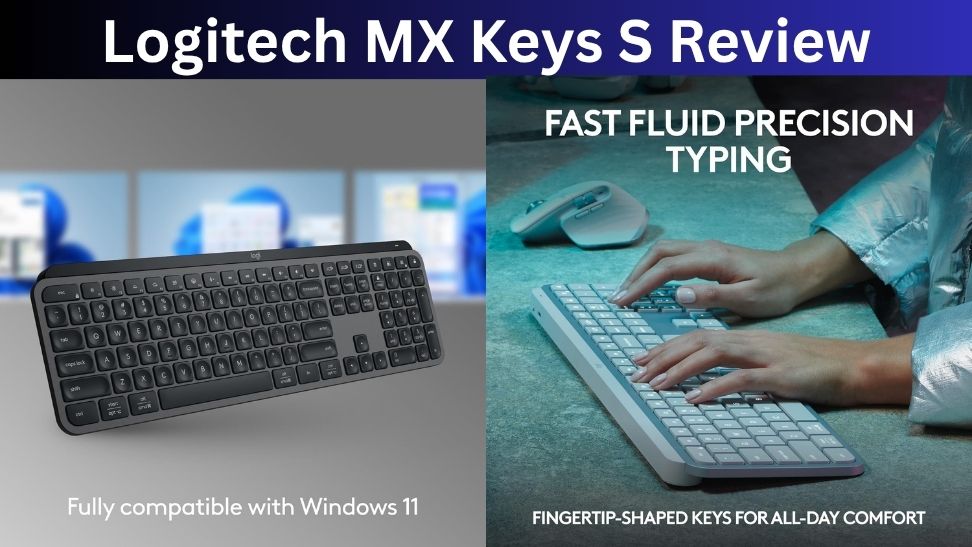
If you spend most of your day typing, a good keyboard can make work much more comfortable. The Logitech MX Keys S is designed for exactly that kind of user. It combines a slim full-size design, low-profile scissor switches, wireless connectivity, backlighting, and customizable controls in a keyboard aimed more at productivity than gaming.
It also works with both Windows and macOS, making it a practical choice for people who use multiple computers.
But with plenty of cheaper wireless keyboards available, is the MX Keys S actually worth its premium price?
After looking at its typing experience, features, connectivity, battery life, and overall value, the MX Keys S is an excellent productivity keyboard, although it isn’t the best choice for everyone.
Logitech MX Keys S: Quick Verdict
Rating: 4.5/5
The MX Keys S is best for office workers, writers, programmers, students, and anyone who wants a comfortable wireless keyboard for everyday productivity.
Its biggest strengths are the excellent typing feel, quiet keys, solid build quality, multi-device support, and useful customization.
The biggest drawbacks are the relatively high price, limited backlight brightness, and large desk footprint.
Best for: Work, writing and productivity
Not ideal for: Competitive gaming or highly portable setups
Verdict: A premium wireless keyboard that is excellent for everyday typing.
Design and Build Quality
The MX Keys S has a full-size layout with a number pad, function row, arrow keys, and a slim low-profile body.
It has a clean, professional appearance that fits naturally into an office or home workspace. The keyboard is also fairly heavy, which helps keep it stable while typing.
The low-profile design is one of its biggest advantages. The keys don’t require a large amount of movement, and the keyboard can be comfortable to use for long periods without needing a separate wrist rest.
However, the full-size design also makes the MX Keys S relatively large and heavy. It’s designed primarily to stay on a desk rather than travel with you. RTINGS similarly rates it highly for office use while noting that its size and weight make it less convenient for portable setups.
Typing Experience
Typing is where the MX Keys S really stands out.
It uses low-profile scissor switches with slightly concave keycaps that help keep your fingers centered. The keys feel responsive without producing the loud sound associated with many mechanical keyboards.
For emails, documents, spreadsheets, programming, and long writing sessions, the keyboard provides a comfortable and controlled typing experience.
The quiet operation is another advantage if you work around other people. You can type throughout the day without creating the sharp clicking noise produced by many mechanical keyboards.
Tom’s Guide also praised the keyboard’s typing experience, particularly its concave keycaps and scissor switches.
Backlighting
The MX Keys S includes individually backlit keys, which makes it easier to type in darker environments.
The backlight can automatically adjust based on surrounding lighting, and Logitech provides additional control through its software.
However, brightness is one area where the keyboard could be better. The white backlight isn’t particularly powerful, and some users may find it less impressive than expected at this price.
If you frequently work in a dark room, this is worth considering before buying.
Wireless Connectivity
The MX Keys S can connect through Bluetooth or Logitech’s Logi Bolt receiver. It can also switch between multiple connected devices.
This makes it particularly useful if you work with a Windows PC and MacBook, or regularly move between a work computer and personal device.
Switching between devices is simple, and the multi-device functionality is one of the features that separates the MX Keys S from many ordinary wireless keyboards.
The keyboard also supports Windows, macOS, Linux, and other compatible devices.
Battery Life
Battery life is another strong point.
Logitech rates the MX Keys S for up to 10 days with backlighting enabled and up to five months with backlighting disabled. Actual battery life will depend on how you use the keyboard and how frequently the backlight activates.
For most users, this means charging shouldn’t become a regular part of their daily routine.
USB-C charging also makes it easy to top up the keyboard using the same type of cable commonly used with modern laptops, phones, and other accessories.
Logitech Options+ Software
The MX Keys S becomes more flexible when paired with Logitech’s Options+ software.
You can customize function keys, create shortcuts, adjust backlighting behavior, and configure Smart Actions for repetitive tasks.
This is particularly useful for people who spend a lot of time in specific applications. You can set up controls around your workflow instead of relying entirely on the keyboard’s default functions.
The software is easy enough for beginners while still offering useful customization for power users.
Logitech MX Keys S vs MX Keys
The MX Keys S is an evolution of the original MX Keys rather than a completely different keyboard.
The newer model adds automatic backlight adjustment, updated function-row shortcuts, Logi Bolt connectivity, and additional software customization.
If you already own the original MX Keys and it works well, the upgrade isn’t essential. But if you’re buying your first MX-series keyboard, the MX Keys S is the more complete option.
Pros and Cons
Pros
- Excellent typing experience
- Comfortable low-profile design
- Quiet scissor switches
- Solid build quality
- Multi-device connectivity
- Useful customization
- Good battery life
- Works with Windows and Mac
Cons
- Relatively expensive
- Backlighting could be brighter
- Large and heavy for travel
- No built-in dongle storage
Who Should Buy the Logitech MX Keys S?
The MX Keys S makes the most sense for people who spend several hours a day typing.
It’s a particularly good choice for writers, office professionals, programmers, students, and anyone who wants a quiet keyboard that works across multiple computers.
It’s also a good option if you prefer laptop-style keys but want a dedicated desktop keyboard.
Who Should Skip It?
You should consider another keyboard if you want mechanical switches, competitive gaming performance, or something compact enough to carry around regularly.
It’s also worth considering cheaper alternatives if you’re simply looking for a basic wireless keyboard. The MX Keys S offers plenty of features, but you pay a premium for them.

Final Verdict
The Logitech MX Keys S is a polished wireless keyboard focused on productivity rather than gaming. Its low-profile scissor switches provide a comfortable and quiet typing experience, while multi-device connectivity and Logitech’s customization software make it especially useful for people with busy workflows.
The biggest weaknesses are its price, size, and relatively modest backlighting. These aren’t deal-breakers, but they do make the keyboard less attractive for casual users.
For anyone who spends hours typing and wants a premium wireless keyboard for a desk-based setup, the MX Keys S remains one of the better choices in 2026. If you value typing comfort and productivity more than gaming features, it’s worth considering.
Topgadgets.online is a participant in the Amazon Services LLC Associates Program, an affiliate marketing program that enables website owners to earn referral commissions by linking to products available on Amazon.com and related Amazon marketplaces.